


 Call us: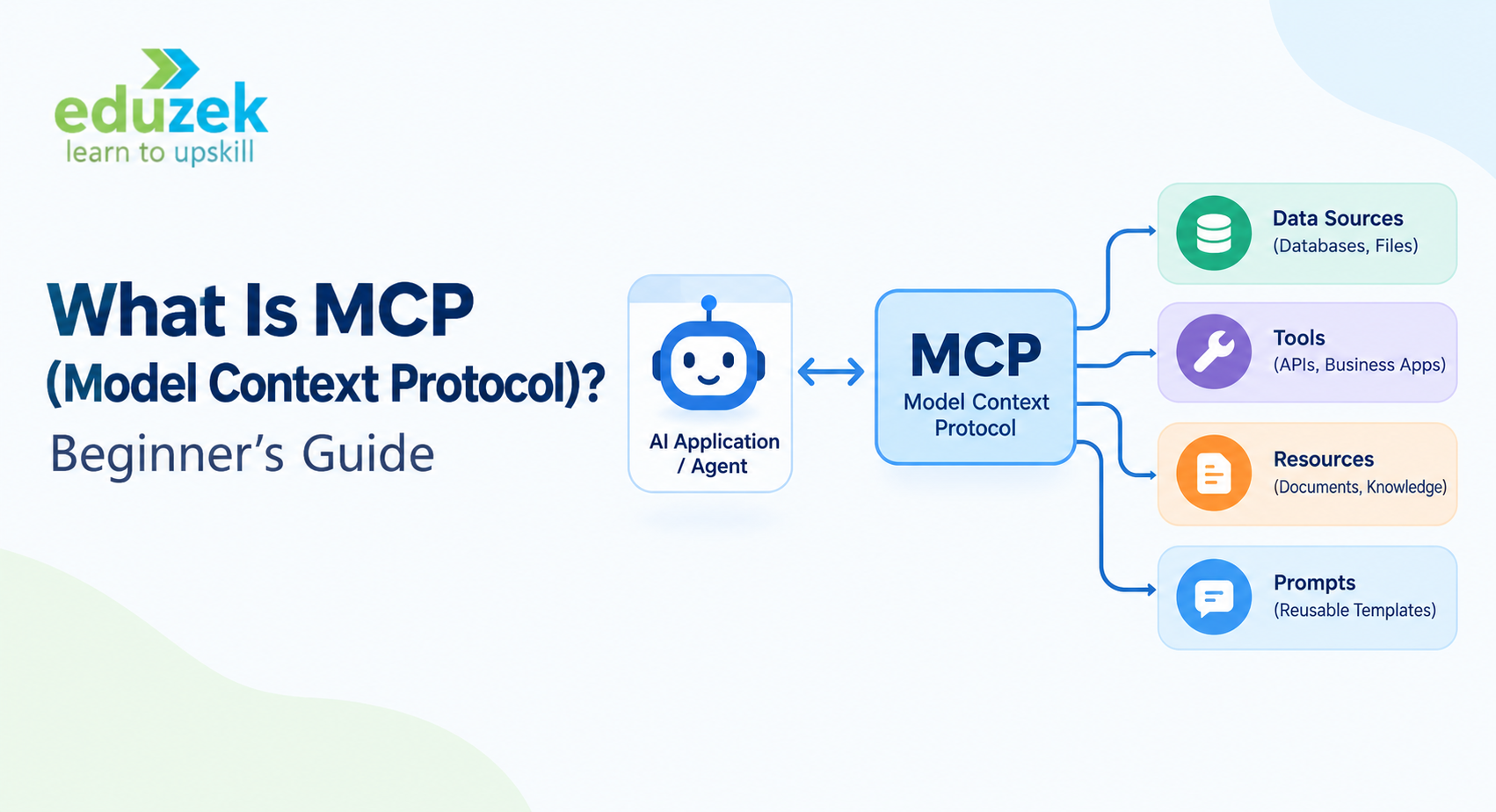
What Is MCP? Beginner's Guide to Model Context Protocol
Introduction: What Is MCP (Model Context Protocol)?
Artificial intelligence is evolving beyond simple question-and-answer interactions. Modern AI applications can retrieve information, interact with external tools, access business data, and execute multi-step workflows. However, connecting AI models to different applications, databases, and services can be challenging without a consistent integration method.
This is where the Model Context Protocol (MCP) becomes important.
MCP is an open protocol that standardizes how AI applications connect to external data sources, tools, and services. Introduced by Anthropic in November 2024, MCP provides a common way for AI applications to discover and use capabilities exposed by compatible systems.
Think of MCP as a USB-C connection for AI applications. A USB-C port allows compatible devices to connect without requiring a different physical connector for every device. Similarly, MCP provides a standard interface through which compatible AI applications can connect to different tools and information sources.
For example, imagine building an AI assistant that needs to search company documents, retrieve information from a database, check project updates, and create reports. Without a standardized protocol, developers might need to build separate integrations for every application. MCP can simplify this process by providing a common communication standard.
In this beginner's guide, you will learn what MCP is, how it works, what MCP servers do, how MCP supports AI agents, and how to start learning MCP through practical projects.
If you want to explore the broader AI ecosystem alongside MCP, Eduzek's Agentic AI Course Training in India is a relevant starting point for understanding AI agents, tool calling, retrieval-augmented generation (RAG), and agent workflows.
What Is Model Context Protocol (MCP)?
The Model Context Protocol is an open standard that enables AI applications to communicate with external systems through a consistent interface.
It helps developers connect language models and AI-powered applications to capabilities such as:
- Searching files and documents.
- Retrieving information from databases.
- Accessing approved APIs and business applications.
- Calling external tools.
- Reading structured information from connected services.
- Performing permitted actions through compatible integrations.
- Supplying reusable instructions and context to AI applications.
MCP does not replace the language model, an AI agent framework, or the underlying application. Instead, it provides a standardized way to connect an AI application with external capabilities.
For example, a language model may understand a user's request to find recent project updates. However, it cannot access a private project management system simply because it understands the request. The application needs an authorized integration that retrieves the relevant information.
An MCP server can expose a search capability from that project management system. An MCP-compatible client can discover the capability and make it available to the AI application. The application can then use the retrieved information to answer the user's question.
This separation makes it easier to build reusable integrations and connect compatible tools to different AI applications.
Why Was MCP Introduced?
Before standardized protocols became available, developers often built custom integrations between AI applications and individual services.
For instance, a company might need separate integration code to connect an AI assistant to a document platform, a database, a code repository, and a customer relationship management system.
Each integration could have its own authentication requirements, data formats, tool definitions, and error-handling logic. Maintaining these integrations becomes more complicated as the number of connected systems grows.
MCP addresses this integration challenge by providing a common protocol for communication between AI applications and external capabilities.
Its key objectives include:
- Standardizing communication between compatible AI applications and services.
- Reducing duplicated integration work.
- Making tools and context easier to discover.
- Encouraging reusable server implementations.
- Supporting a growing ecosystem of AI integrations.
MCP does not automatically make every application compatible, eliminate all integration work, or guarantee secure behavior. Developers still need to implement compatible servers, configure permissions, handle errors, and validate results.
How Does MCP Work?
MCP follows a client-server architecture. An AI application communicates with an MCP server through an MCP client, which manages the protocol interaction.
The basic workflow looks like this:
- A user sends a request to an AI application.
- The application determines whether an external tool or data source is needed.
- The MCP client connects to an appropriate MCP server.
- The client discovers available tools or other supported capabilities.
- The AI application selects a suitable capability based on the user's request and the information available to it.
- The client sends the relevant request to the server.
- The server performs the permitted operation and returns a result.
- The AI application uses that result to formulate a response or continue its workflow.
For example, suppose a user asks an AI assistant, "Find the latest customer feedback in our support database and summarize the main complaints."
The assistant may need to access a database or support platform. An MCP server could expose a tool that searches approved feedback records. The AI application can use that tool through an MCP client, receive the results, and summarize the information.
The AI model does not automatically gain unrestricted database access. The server, application, authentication configuration, and available permissions determine what operations can be performed.
A Simple Example of MCP in Action
Imagine a business assistant connected to three services:
- A document repository containing company policies.
- A database containing sales information.
- A project management platform containing task updates.
Without MCP, developers may need to create and maintain separate integration patterns for each service.
With MCP, each service can expose appropriate capabilities through an MCP server. A compatible AI application can connect to those servers through the protocol.
When a manager asks, "Summarize our sales performance and identify the projects delayed this week," the application could retrieve authorized sales information, query project updates, and combine the results into a single response.
This example illustrates the value of standardized connectivity. The actual workflow still depends on the AI application's orchestration logic, the tools available, the user's permissions, and the quality of the returned data.
Understanding MCP Architecture
To learn MCP effectively, it is important to understand its main architectural components.
1. MCP Host
The MCP host is the AI application that coordinates the user experience and manages connections to MCP servers.
Examples of possible hosts include AI assistants, development environments, and custom AI applications that support MCP.
The host is responsible for coordinating the interaction between the user, the AI model, and the connected MCP capabilities.
Typical responsibilities include:
- Receiving user requests.
- Providing context to the model.
- Managing MCP client connections.
- Controlling which integrations are available.
- Applying application-level permission and approval policies.
- Presenting the final response.
For example, a developer might build a desktop AI assistant that uses MCP to retrieve information from local development resources.
2. MCP Client
An MCP client is the component that communicates with an MCP server on behalf of the host.
It handles protocol-level interactions, including capability discovery and requests to the server.
Its responsibilities may include:
- Establishing and maintaining connections.
- Discovering supported server capabilities.
- Sending tool calls or other protocol requests.
- Receiving server responses.
- Handling connection errors and protocol communication.
A host can manage connections to multiple MCP servers through client instances.
3. MCP Server
An MCP server exposes selected capabilities of an application, database, service, or other system through the MCP protocol.
For example, an MCP server could expose tools that allow an authorized AI application to search documents, query a database, retrieve issue details, or interact with a supported API.
An MCP server does not have to be a large cloud application. It can be a small program that exposes a limited set of capabilities.
A well-designed server should define its tools clearly, validate inputs, enforce access controls, handle errors, and return useful results.
4. External Data Sources and Tools
These are the systems that the MCP server connects to or operates on.
Examples include:
- SQL databases.
- File systems.
- Internal company knowledge bases.
- Code repositories.
- Project management platforms.
- Customer support systems.
- Business APIs.
- Analytics applications.
The server provides the controlled interface between these systems and the AI application.
MCP Architecture at a Glance
| ComponentMain ResponsibilityExample | ||
| MCP host | Coordinates the AI application | A desktop AI assistant |
| MCP client | Communicates with MCP servers | A client managed by the assistant |
| MCP server | Exposes tools and context | A server offering database search |
| External system | Supplies data or performs operations | A company database |
| AI model | Interprets requests and generates responses | An LLM used by the assistant |
Understanding these components is an important first step toward building MCP integrations and AI agent applications.
What Are MCP Tools, Resources, and Prompts?
MCP supports different types of capabilities. Three important concepts are tools, resources, and prompts.
1. MCP Tools
Tools are executable capabilities that an AI application can discover and invoke through an MCP server.
Examples include:
- Searching a database.
- Looking up a customer record.
- Creating a support ticket.
- Retrieving a project's status.
- Running an approved calculation.
- Sending information to a connected service.
A tool typically has a name, description, and input schema that help an application understand how to use it.
For example, a server might expose a tool called search_documents that accepts a search query and returns matching documents.
The tool description and input schema help the AI application understand the tool's intended purpose. However, developers must still validate inputs and ensure that the tool performs only permitted operations.
2. MCP Resources
Resources provide access to contextual information through a standardized interface.
Examples may include:
- Documentation.
- Project files.
- Database records.
- Reference material.
- Configuration information.
- Internal knowledge base content.
Resources help AI applications access information that may be useful when responding to a user.
For instance, a company knowledge server could expose approved policy documents so an AI assistant can retrieve relevant context before answering an employee's question.
Resources and tools are related but not identical. A resource represents information that can be accessed, while a tool represents an operation that can be invoked.
3. MCP Prompts
Prompts are reusable prompt templates or instructions that an MCP server can expose to compatible clients.
They can help users initiate structured workflows without writing every instruction from scratch.
For example, a server could provide a reusable prompt for reviewing a software issue, summarizing a document, or preparing a project status report.
A prompt may guide the AI application's interaction with tools and information, but it does not automatically guarantee a correct result.
Difference Between MCP Tools, Resources, and Prompts
| FeatureMCP ToolsMCP ResourcesMCP Prompts | |||
| Primary purpose | Perform an operation | Provide information or context | Provide reusable instructions |
| Typical interaction | Invoke a tool | Read or access a resource | Select or retrieve a prompt template |
| Example | Search support tickets | Access a support knowledge article | Generate a support-case summary |
| Main value | Enables external actions | Makes contextual information available | Standardizes common workflows |
These concepts are central to the MCP specification. Understanding them helps developers design integrations that expose the right capabilities to AI applications.
What Is an MCP Server?
An MCP server is a program that implements the Model Context Protocol and exposes selected capabilities to compatible clients.
It acts as an interface between an AI application and an external system.
For example, a company may have an internal database containing customer orders. An MCP server can expose a limited set of operations, such as searching orders by ID or retrieving the status of a particular order.
The AI application does not need to understand every detail of the database implementation. It can interact with the server through the capabilities the server makes available.
How Does an MCP Server Work?
A typical MCP server workflow includes the following steps:
- The developer identifies the external system or capability that needs to be exposed.
- The developer implements the server using an appropriate SDK or compatible implementation.
- The server defines its available tools, resources, or prompts.
- The server validates incoming requests and applies access controls.
- An MCP client connects and discovers the server's capabilities.
- The client requests an operation when needed.
- The server performs the operation and returns a response.
For example, a document-search server could accept a search query, retrieve matching documents from an approved repository, and return document titles and relevant excerpts.
The AI application can then use the returned information to answer the user's question.
Types of MCP Servers
MCP servers can be organized by the systems or capabilities they expose.
File system servers: Provide controlled access to approved files and directories.
Database servers: Expose selected database queries or operations.
API integration servers: Make external APIs accessible through MCP tools.
Knowledge retrieval servers: Search documentation, policies, and other knowledge sources.
Developer tool servers: Connect AI applications to development tools, code repositories, or issue trackers.
Business application servers: Expose selected capabilities from approved CRM, support, project management, or analytics systems.
The correct server architecture depends on the application, deployment environment, data sensitivity, and required access controls.
What Is the Difference Between MCP and Traditional API Integration?
Traditional APIs allow applications to communicate through defined interfaces. MCP does not replace APIs; it provides a standardized way for compatible AI applications to discover and interact with capabilities exposed by MCP servers.
In many implementations, an MCP server uses an existing API internally.
For example, a project management platform may already provide a REST API. An MCP server can expose selected operations from that API as MCP tools so a compatible AI application can discover and invoke them through a consistent protocol.
| FeatureTraditional API IntegrationMCP Integration | ||
| Primary purpose | Application-to-application communication | Standardized AI application access to tools and context |
| Interface | Depends on the API design | Follows MCP protocol conventions |
| Tool discovery | Depends on the API and integration | MCP clients can discover advertised capabilities |
| AI-specific workflow | Usually requires additional application logic | Designed to support AI application interactions with external capabilities |
| Reusability | Depends on implementation | Compatible clients can reuse the same server interface |
| Security | Depends on API and application controls | Still requires authentication, authorization, validation, and appropriate policies |
MCP does not remove the need to understand APIs, authentication, data models, or error handling. Instead, it can reduce the need to implement a completely different AI-facing integration for every connected service.
MCP vs Function Calling: What Is the Difference?
Function calling is a mechanism through which a model or AI application selects a function and provides structured arguments for execution.
MCP is a protocol for connecting AI applications to external tools, resources, and prompts.
They solve related but different problems.
For example, a model might request a function called get_customer_orders. The application then executes that function and returns the result.
With MCP, a compatible application can discover a tool exposed by an MCP server and invoke it through the protocol. The application's model interaction and tool-execution logic determine how that capability is used.
| AspectFunction CallingMCP | ||
| Purpose | Structure a model's request to invoke a function | Standardize access to external capabilities |
| Scope | Often tied to an application or model integration | Designed for reusable client-server connectivity |
| Discovery | Defined by the application or model interface | Server capabilities can be discovered through MCP |
| Execution | Application code typically executes the function | An MCP client invokes a server capability |
| Relationship | Can be used alongside MCP | Can provide tools to an AI application that uses function calling |
Developers can use both approaches together. MCP provides the connection mechanism, while the AI application decides when and how to use the connected capabilities.
What Is the Difference Between MCP and RAG?
Retrieval-Augmented Generation (RAG) is a technique that retrieves relevant information and supplies it to a language model to help generate a grounded response.
MCP is a communication protocol that enables AI applications to access external capabilities.
The two technologies can complement each other.
For example, a RAG application may search a vector database for relevant documents. An MCP server could expose a search operation that allows a compatible AI application to request those documents.
The application could then use the retrieved passages as context for the language model.
However, MCP is not itself a retrieval algorithm, embedding model, vector database, or RAG framework.
| AspectMCPRAG | ||
| Primary role | Standardizes access to external capabilities | Retrieves relevant knowledge for generation |
| Main components | Hosts, clients, servers, tools, resources, prompts | Knowledge sources, retrieval, context construction, language model |
| Typical purpose | Connect AI applications to systems | Ground model responses in relevant information |
| Can they work together? | Yes | Yes |
If you want to study these concepts as part of a broader curriculum, Eduzek's Generative AI Course Training in India is relevant for exploring language models, retrieval, and other generative AI foundations.
How Does MCP Support Agentic AI?
Agentic AI refers to AI systems that can work toward goals by planning tasks, using tools, observing results, and coordinating multiple steps.
An AI agent may need to search documents, call APIs, retrieve records, and take actions to complete a workflow.
MCP can provide a standardized interface to some of those external capabilities.
For example, consider an AI agent designed to help a software team investigate a production issue.
The agent might need to:
- Retrieve relevant issue details from a project management system.
- Search a code repository for related changes.
- Retrieve relevant application logs from an authorized monitoring service.
- Compare the findings.
- Draft a summary and suggest next steps.
Different MCP servers could expose the required capabilities. The agent's orchestration layer would decide how to use them and how to combine their results.
MCP does not independently provide planning, autonomous reasoning, memory management, or multi-agent orchestration. Those capabilities come from the AI model, agent framework, and surrounding application logic.
MCP and Agentic AI: Why Developers Should Learn Both
Learning MCP alongside Agentic AI can help developers understand both the integration layer and the application logic required to build connected AI systems.
MCP helps with standardized access to external capabilities, while agent frameworks can manage task planning, state, conditional execution, retries, and multi-step workflows.
For a broader learning path, explore Eduzek's Generative AI and Agentic AI Training for Working Professionals. This is particularly relevant if you want to understand how LLM applications, RAG, and agent frameworks fit together in practical development.
Real-World Use Cases of MCP
MCP can be useful wherever an AI application needs controlled access to external information or tools.
1. AI-Powered Customer Support
A support assistant could use MCP servers to access approved knowledge articles, retrieve support ticket details, and check order information.
When a customer asks about an unresolved issue, the assistant could retrieve the relevant record and provide a context-aware response.
Any action that modifies customer records or issues refunds should have appropriate authorization, validation, and approval controls.
2. Software Development Assistants
Developers can connect compatible AI applications to code repositories, issue trackers, and development resources through MCP servers.
Possible workflows include searching for related issues, retrieving documentation, reviewing code changes, and summarizing project activity.
Access to sensitive repositories and the ability to modify code should be limited to authorized users and tools.
3. Business Intelligence and Data Analysis
An AI assistant could use MCP tools to query approved datasets, retrieve reports, or obtain information from business applications.
For example, a manager could request a summary of regional sales performance. The application could retrieve authorized sales records and generate an explanation based on the results.
Sensitive financial or operational queries should enforce data permissions and validate the correctness of calculations.
4. Internal Knowledge Management
Organizations often store information across documents, knowledge bases, shared drives, and internal applications.
MCP servers can expose search or retrieval capabilities from these systems, helping an AI assistant find relevant information without requiring a separate custom AI integration for every source.
The server should respect the access permissions associated with the underlying information.
5. Workflow Automation
MCP can provide access to tools that support approved business operations, such as creating tasks, retrieving records, or preparing reports.
For example, an AI workflow could review a support request, retrieve related information, draft a ticket, and ask for human approval before submitting it.
The protocol provides connectivity, while the application determines which actions are allowed and when approvals are required.
6. Research and Document Analysis
An AI research assistant could use MCP tools to search approved document collections, retrieve source material, and organize findings.
This can support research workflows that involve multiple information sources.
For reliable results, the application should preserve source references, distinguish retrieved evidence from generated conclusions, and verify important claims.
7. Enterprise AI Assistants
Organizations can build AI assistants that access selected enterprise systems through compatible MCP servers.
Potential applications include HR policy assistants, internal IT support, knowledge retrieval, project reporting, and operations support.
Enterprise deployments require particular attention to authentication, authorization, audit logging, data privacy, and governance.
Benefits of Using Model Context Protocol
MCP offers several potential advantages for AI application development.
1. Standardized Integration
MCP provides a common protocol for connecting compatible AI applications to external capabilities.
This can reduce the need to create a completely different AI-facing interface for every service.
2. Reusable Integrations
An MCP server can expose capabilities that compatible clients can reuse, provided they support the relevant protocol features and transport.
This helps developers separate integration logic from the AI application's user experience.
3. Access to External Context
AI applications can retrieve relevant information from approved data sources instead of relying exclusively on information provided in the conversation or encoded in model training.
The quality of the final response still depends on data freshness, retrieval quality, and model behavior.
4. Support for Tool-Using AI Agents
MCP can make external capabilities available to AI agents, supporting workflows that involve information retrieval, tool calls, and actions.
The agent framework and application remain responsible for orchestration and decision-making.
5. Easier Integration Maintenance
A clearly designed MCP server can centralize the logic required to expose a service to compatible AI clients.
Changes to the underlying integration may be managed within the server, reducing duplicated work across applications. Compatibility and maintenance benefits depend on the implementation.
6. A Growing Ecosystem
MCP is an open protocol with implementations, SDKs, and integrations across the AI ecosystem.
Developers can learn from existing implementations and build their own servers for specialized use cases.
Limitations and Challenges of MCP
Although MCP can simplify AI integration, it is not a complete solution for every application.
1. Security Risks
MCP servers may expose sensitive information or perform actions using configured credentials.
Poorly secured implementations can create risks involving unauthorized access, data leakage, or unintended operations.
Developers should use least-privilege permissions, validate inputs, protect credentials, and review the trustworthiness of servers before connecting them.
2. Integration Complexity
Developers still need to understand the underlying API, database, authentication mechanism, and business logic.
MCP standardizes the communication interface, but it does not eliminate the work required to integrate a service correctly.
3. Tool Selection Errors
An AI application may select an inappropriate tool, provide invalid arguments, or misinterpret the returned information.
Clear tool descriptions, input validation, evaluation, and application-level checks can reduce these problems.
4. Performance and Reliability
External requests can introduce latency, network failures, service outages, or rate limits.
Applications should handle timeouts, retries, errors, and partial failures appropriately.
5. Data Quality
MCP does not guarantee that the underlying data is accurate, current, complete, or relevant.
The connected system and the application remain responsible for data quality and result interpretation.
6. Operational Governance
Organizations need clear policies for approving servers, managing credentials, controlling access, monitoring tool use, and auditing sensitive actions.
These requirements become especially important when MCP is used in production environments.
MCP Security Best Practices
Security should be a core part of every MCP implementation.
Follow these practices when building or connecting MCP servers.
Use least-privilege access: Give each server only the permissions it needs. Avoid broad access to entire databases, file systems, or enterprise applications.
Validate every input: Check tool arguments, enforce expected types, and reject invalid or unauthorized requests.
Protect credentials: Store API keys and tokens securely. Avoid exposing credentials in prompts, logs, URLs, or error messages.
Authenticate and authorize users: Ensure the application and server enforce the appropriate identity and access policies.
Review server trustworthiness: Connect only to servers whose source, behavior, and permissions have been reviewed.
Require approval for sensitive actions: Operations such as deleting data, modifying important records, or transferring funds should use appropriate confirmation and authorization controls.
Monitor tool activity: Maintain suitable audit logs and monitor unusual requests, errors, and access patterns.
Handle untrusted content carefully: Retrieved documents and tool outputs may contain misleading instructions or malicious content. Treat external content as data rather than automatically trusted instructions.
Test failure scenarios: Evaluate timeouts, malformed responses, denied permissions, and unexpected tool results.
Keep implementations updated: Track relevant protocol and SDK changes, patch dependencies, and test compatibility before deployment.
MCP provides standardized connectivity, but security depends on how the host, client, server, credentials, and underlying systems are configured.
MCP Tutorial: How to Start Learning MCP
If you are new to MCP, the best approach is to understand the protocol concepts first and then build a small project.
You do not need to begin with a complex enterprise integration.
Step 1: Learn the Basics of Large Language Models
Start by understanding how language models receive input, generate responses, and interact with external tools.
Useful concepts include:
- Large Language Models (LLMs).
- Prompt engineering.
- Structured outputs.
- API requests and responses.
- Function calling.
- Context windows.
- Basic AI application architecture.
These concepts will help you understand why AI applications need access to external data and tools.
Step 2: Understand the MCP Architecture
Learn the difference between an MCP host, client, and server.
Next, explore how clients discover server capabilities and how requests and responses flow between components.
Pay particular attention to tools, resources, prompts, and the distinction between the protocol and the underlying service.
Step 3: Explore the Official MCP Documentation
Anthropic introduced MCP, and the official documentation provides a starting point for learning its architecture and implementation options.
Read the documentation here:
https://docs.anthropic.com/en/docs/mcp
You can also explore the broader protocol documentation and SDK resources at:
https://modelcontextprotocol.io/
Use the current documentation for setup instructions, supported transports, SDK versions, and implementation examples, because technical details can change between releases.
Step 4: Set Up Your Development Environment
For a beginner-friendly project, Python is a practical option.
You should be familiar with:
- Basic Python programming.
- Installing packages.
- Running scripts.
- Using a terminal.
- Reading JSON.
- Making API requests.
- Managing environment variables.
Python is not the only language available for MCP development. Choose an SDK that fits your preferred language and the requirements of your project.
Step 5: Build a Simple MCP Server
Start with a small server that exposes a tool such as a calculator or a controlled document-search function.
For a calculator server, you might expose a tool that accepts two numbers and an operation, validates the inputs, performs the calculation, and returns the result.
This exercise teaches you how a server defines a capability and how a client can discover and invoke it.
Step 6: Connect an MCP Client
Use a compatible MCP host or a small client application to connect to your server.
Test whether the client can discover the tool and invoke it with valid inputs.
Also test invalid inputs, missing arguments, connection failures, and unexpected results.
Step 7: Build an AI-Powered Project
After the basic integration works, build a small application that combines an LLM with your MCP server.
For example, create a document assistant that accepts a user's question, searches an approved collection of documents, and summarizes the retrieved results.
Make sure the application distinguishes between information returned by the server and conclusions generated by the model.
Step 8: Add Security and Error Handling
Before extending the project, add input validation, appropriate access controls, secure credential handling, logging, and error handling.
If the application performs sensitive actions, add an explicit approval mechanism.
Step 9: Integrate MCP With an AI Agent
Once you understand the fundamentals, connect your MCP server to an agent application.
Create a workflow in which the agent retrieves information, calls a tool, evaluates the result, and produces a final answer.
This step helps you understand how MCP fits into a larger agent architecture.
MCP Crash Course: What Should You Learn First?
An MCP crash course should focus on the essential concepts required to understand and build a basic integration.
A practical learning sequence could include the following modules.
Module 1: Introduction to MCP
Learn the definition of Model Context Protocol, why it exists, and how it differs from custom integrations.
Module 2: MCP Architecture
Understand hosts, clients, servers, and external services.
Learn how discovery, requests, and responses work.
Module 3: MCP Tools, Resources, and Prompts
Explore the three major server capabilities and when each one is appropriate.
Module 4: Development Environment and SDKs
Set up a development environment and learn the basics of the SDK for your chosen programming language.
Module 5: Building an MCP Server
Create a simple server, define a tool, validate inputs, and return results.
Module 6: Connecting an MCP Client
Connect to the server, discover capabilities, and test requests.
Module 7: Connecting MCP to an AI Application
Integrate the server with a compatible AI host or application and test a complete user workflow.
Module 8: Security and Troubleshooting
Study authentication, authorization, input validation, credential protection, error handling, and server trust.
A short crash course is useful for learning the core concepts. However, building production-ready MCP integrations usually requires additional practice with application development, testing, security, deployment, and monitoring.
MCP Full Course: A Structured Learning Roadmap
If you want deeper technical knowledge, an MCP full course should move beyond basic definitions and include hands-on implementation.
The following roadmap can be used for self-study or as a structure for a practical training program.
Beginner Level: Foundations
Learn Python or another supported programming language, JSON, HTTP fundamentals, API integration, and basic LLM application development.
Understand the purpose of MCP and the roles of hosts, clients, and servers.
Suggested project: Build a small MCP server that exposes a calculator tool.
Intermediate Level: Server Development
Learn how to define tools, resources, and prompts.
Practice input validation, error handling, configuration, client connections, and supported transport options.
Suggested project: Build a document-search server that exposes an approved collection of sample documents.
Advanced Level: AI Agent Integration
Learn how to connect MCP servers to an AI application or agent framework.
Explore tool selection, multi-step workflows, RAG integration, and stateful orchestration.
Suggested project: Create an AI research assistant that retrieves documents and produces a structured summary with source references.
Production Level: Security and Deployment
Learn server authentication, authorization, secret management, logging, testing, deployment, and monitoring.
Understand the differences between local development and remote server deployment.
Suggested project: Build a controlled business assistant that connects to an approved data source and requires confirmation before performing sensitive actions.
Portfolio Development
Document each project with:
- A clear problem statement.
- An architecture overview.
- Setup instructions.
- Tool and resource definitions.
- Example requests and responses.
- Security considerations.
- Testing results.
- Known limitations.
- A demonstration or repository, where appropriate.
A project portfolio helps demonstrate practical knowledge more effectively than relying on terminology alone.
MCP Server Certification: What You Need to Know
The keyword "MCP server certification" is relevant to learners who want to demonstrate their knowledge of MCP architecture, server development, and AI integration.
However, learning MCP and obtaining an official certification are not the same thing.
The availability, recognition, and requirements of a certification depend on the organization offering it. Do not assume that completing an online tutorial or an MCP project automatically grants an official Anthropic certification.
Before enrolling in a certification program, verify:
- Who issues the certificate.
- Whether the program is officially affiliated with Anthropic or another organization.
- Which topics and technical skills are assessed.
- Whether the assessment includes practical server development.
- Whether there is an examination or project requirement.
- What the certificate represents.
- Whether the certificate is recognized by your intended employer or organization.
What Skills Should an MCP Server Developer Demonstrate?
A developer preparing for an MCP-focused assessment should be able to explain and demonstrate the following skills.
Protocol fundamentals: Explain the purpose of MCP and distinguish hosts, clients, and servers.
Capability design: Define tools, resources, and prompts that solve a clear problem.
Server implementation: Build a basic server using a suitable SDK.
Client integration: Connect to a server, discover capabilities, and invoke tools.
Input validation: Validate arguments and handle invalid requests safely.
Error handling: Respond appropriately to failed operations, connection problems, and unexpected results.
Security: Apply least-privilege access, protect credentials, and restrict sensitive operations.
Testing: Verify expected behavior, edge cases, and failure scenarios.
AI integration: Connect the server to a compatible AI application and test the complete workflow.
Documentation: Explain how to configure, run, test, and maintain the implementation.
These skills can support your development portfolio even when a particular certification is unavailable or not required for your role.
Can You Learn MCP Through an Agentic AI Course?
Yes. MCP is a useful topic to study alongside AI agent development because agents often need access to external tools and data.
A broader Agentic AI curriculum can help you understand how MCP fits alongside LLMs, tool calling, RAG, agent frameworks, and workflow orchestration.
Explore Eduzek's Agentic AI Course Training in India to learn more about its training approach and MCP-related learning opportunities.
For exact MCP coverage, practical assessments, and certification details, confirm the current syllabus and certificate terms with Eduzek before enrolling.
Who Should Learn MCP?
MCP can be useful for several categories of learners.
Software Developers
Developers can learn to build integrations that connect AI applications to APIs, databases, and internal tools.
Knowledge of Python, JavaScript, TypeScript, or another suitable programming language can help.
AI and Machine Learning Engineers
AI engineers can explore how MCP connects LLM applications to external capabilities and how it fits into tool-using AI systems.
Generative AI Developers
Developers working with LLM applications can learn to expose reusable tools and data sources to compatible AI clients.
Agentic AI Engineers
Agentic AI engineers can use MCP to make approved external capabilities available to agents that perform multi-step tasks.
Data Engineers and Analysts
Data professionals can explore controlled ways to expose data retrieval and analytical operations to AI applications.
Technical Students and Beginners
Students interested in AI application development can use MCP projects to learn about protocol design, API integration, and tool-enabled AI systems.
Beginners should start with programming and API fundamentals before attempting complex server deployments.
What Are the Prerequisites for Learning MCP?
MCP can be approached by beginners, but practical implementation requires some technical foundations.
Programming Fundamentals
Python is a useful starting point, although other supported languages are also available.
Learn variables, functions, modules, error handling, and basic data structures.
APIs and JSON
Understand how applications exchange information, how HTTP requests work, and how JSON represents structured data.
LLM Fundamentals
Learn how AI models receive prompts, generate responses, and use tools through an application.
Basic Security Concepts
Understand authentication, authorization, secret management, and why external tool access needs appropriate restrictions.
Will You Need Advanced Machine Learning?
Not necessarily. Building a basic MCP server generally focuses more on application development and protocol integration than on training machine learning models.
You can learn MCP without developing your own LLM, although deeper knowledge of LLMs and agent frameworks is valuable for advanced projects.
Career Opportunities Related to MCP and AI Agents
MCP is an integration technology rather than a standalone career path. However, practical MCP knowledge may be relevant to roles involving AI application development and intelligent automation.
Potentially relevant roles include:
AI Engineer: Develops AI-powered applications and integrates models with external services.
Generative AI Developer: Builds applications using LLMs, structured outputs, retrieval, and tool calling.
Agentic AI Engineer: Designs agent workflows involving planning, tool use, and multi-step execution.
LLM Application Developer: Connects language models to APIs, databases, and application interfaces.
AI Automation Engineer: Develops workflows that combine AI capabilities with business processes.
AI Solutions Developer: Designs and implements AI applications that address specific organizational needs.
AI Integration Engineer: Connects AI systems to enterprise platforms and data sources.
The skills required for these roles vary by employer. Many positions also require software engineering, API integration, cloud infrastructure, data engineering, or application security experience.
How Can MCP Projects Support Your Career?
Build a portfolio that demonstrates how you solve practical problems with MCP.
Examples include:
- A document assistant that retrieves relevant information from approved files.
- A database assistant that exposes safe, read-only query capabilities.
- A development assistant that searches issues and documentation.
- A customer support workflow that retrieves ticket information.
- A research assistant that combines retrieval with structured reporting.
- An AI agent that uses tools through MCP and requests approval before sensitive actions.
Document the architecture, testing approach, permissions, and limitations of each project.
A portfolio can help you discuss implementation decisions during interviews and demonstrate that you understand more than the basic definition of MCP.
Learn Generative AI and Agentic AI With Eduzek
Learning MCP is a useful step toward building AI applications that interact with external systems. However, developers who want to create complete AI agent solutions should also understand LLM fundamentals, retrieval, tool calling, application architecture, and workflow orchestration.
Eduzek offers training options covering broader Generative AI and Agentic AI topics.
1. Agentic AI Course Training in India
Explore Eduzek's Agentic AI course if your goal is to learn how AI agents use tools, retrieve information, coordinate workflows, and work with technologies such as LangChain, LangGraph, RAG, and MCP.
This learning path is relevant for developers who want to move from basic LLM applications toward more sophisticated agentic systems.
2. Generative AI and Agentic AI Training for Working Professionals
If you are balancing professional responsibilities with technical learning, explore Eduzek's Generative AI and Agentic AI training for working professionals.
Review the current curriculum and training format to understand how the program fits your schedule, existing experience, and learning goals.
3. Generative AI Course Training in India
If you want to strengthen your understanding of generative AI before moving into advanced agent development, explore Eduzek's Generative AI course training in India.
A strong foundation in LLMs, prompts, retrieval, and AI application development can help you understand how MCP fits into a complete generative AI solution.
Before enrolling in any program, confirm the latest syllabus, course duration, prerequisites, training format, fees, project requirements, and certification details directly with Eduzek.
Frequently Asked Questions About MCP (Model Context Protocol)
1. What is MCP (Model Context Protocol)?
Model Context Protocol (MCP) is an open protocol that standardizes how AI applications connect to external data sources, tools, and services. It enables compatible applications to discover and use capabilities exposed by MCP servers through a common communication interface.
2. Who created Model Context Protocol?
Anthropic introduced MCP in November 2024 as an open protocol for connecting AI assistants to external systems and data sources. It was designed to make integrations more consistent and reusable across compatible AI applications.
3. What is an MCP server?
An MCP server is a program that exposes capabilities such as tools, resources, or prompts to compatible AI applications. Depending on its implementation and permissions, it may provide access to documents, databases, APIs, or business applications.
4. How does MCP work?
An AI application uses an MCP client to communicate with an MCP server. The client can discover the server's capabilities, send requests, and receive results. The AI application then uses those results to answer a question or continue a workflow, subject to its configured permissions and logic.
5. What is the difference between MCP and an API?
An API defines an interface for software systems to communicate. MCP provides a standardized protocol for AI applications to access tools and context exposed by compatible servers. An MCP server can use an existing API internally, so MCP complements rather than replaces traditional APIs.
6. What is the difference between MCP and function calling?
Function calling lets an AI model or application request that a function be executed using structured arguments. MCP standardizes how an AI application connects to external capabilities. An application can use function calling alongside MCP to make decisions about which connected tools to invoke.
7. What are MCP tools, resources, and prompts?
MCP tools are executable capabilities, resources provide access to information or context, and prompts are reusable prompt templates or instructions. These features help compatible AI applications interact with external systems in different ways.
8. What is an MCP crash course?
An MCP crash course is a short, focused learning program that introduces MCP fundamentals, architecture, tools, resources, prompts, client-server communication, and basic implementation. A practical crash course should include at least one hands-on exercise connecting a client to an MCP server.
9. What should an MCP full course cover?
An MCP full course should cover protocol fundamentals, server development, client integration, tool and resource design, SDK usage, authentication, security, error handling, testing, and deployment. Advanced learning can include integration with LLM applications, RAG systems, and AI agent frameworks.
10. Is there an official MCP course by Anthropic?
Anthropic provides official MCP documentation, implementation guidance, and developer resources. These are useful starting points for learning MCP. Before treating any program as an official Anthropic course, verify its current availability and affiliation through Anthropic's official channels.
11. Is MCP certification available?
Certification availability depends on the organization and program offering it. Before pursuing an MCP server certification, verify the issuing organization, assessment process, technical requirements, and recognition. Completing an MCP tutorial or building a server does not automatically provide an official Anthropic certification.
12. What is required to become an MCP server developer?
You should understand basic programming, APIs, JSON, error handling, and authentication. Practical MCP development also requires knowledge of server implementation, tool definitions, client connections, input validation, security, and testing. Advanced work may require cloud deployment and application monitoring skills.
13. Can beginners learn MCP without AI experience?
Yes. Beginners can learn MCP by starting with programming fundamentals, APIs, and basic LLM concepts. Building a simple server that exposes a calculator or document-search tool is a useful way to understand the protocol before progressing to more complex AI agent projects.
14. Which programming language is best for MCP development?
Python is a practical choice for beginners because it is widely used in AI application development. TypeScript and other supported languages are also suitable. Choose a language based on your existing skills, the available SDK, and the requirements of your intended project.
15. How is MCP used in Agentic AI?
MCP allows compatible AI applications and agents to access external tools and information through a standardized interface. An agent may use these capabilities during a multi-step workflow, while its model and orchestration framework manage planning, decisions, and execution.
16. What is the difference between MCP and RAG?
RAG retrieves relevant information and provides it to a language model to help generate grounded responses. MCP standardizes access to external capabilities. An MCP server can expose a retrieval operation that supports a RAG workflow, but MCP itself is not a RAG algorithm.
17. Is MCP secure?
MCP can be used securely, but security depends on the implementation and deployment. Developers should review server trustworthiness, use least-privilege permissions, protect credentials, validate inputs, enforce authorization, and require approval for sensitive actions. Connecting to an MCP server does not automatically make its tools safe.
18. What projects can I build while learning MCP?
You can build a calculator server, document-search assistant, database query tool, development assistant, customer support integration, or AI research assistant. Start with read-only operations, then add more complex workflows after implementing suitable access controls and testing.
19. What are the career benefits of learning MCP?
MCP knowledge can complement skills used in AI engineering, Generative AI development, LLM application development, Agentic AI, and AI integration. Its value depends on your ability to build reliable applications and demonstrate relevant programming, security, testing, and integration skills. Learning MCP alone does not guarantee employment.
20. Where can I learn MCP and Agentic AI in India?
Start with the official Anthropic MCP documentation for protocol fundamentals. For broader learning, explore Eduzek's Agentic AI Course Training in India, Generative AI and Agentic AI Training for Working Professionals, and Generative AI Course Training in India. Review the current course curriculum and confirm the MCP coverage, practical projects, and certification details before enrolling.
Conclusion: Is Learning MCP Worth It?
The Model Context Protocol is an important technology for developers building AI applications that need access to external tools, data, and services.
By standardizing communication between compatible AI applications and MCP servers, MCP can make integrations more reusable and help developers connect AI systems to the information and capabilities they need.
Understanding MCP architecture, tools, resources, prompts, server development, and security provides a foundation for building connected AI applications.
For beginners, the best learning path is to start with the fundamentals, build a simple MCP server, connect a client, and then create a practical AI-powered project. Once you understand the protocol, explore how it fits into RAG pipelines and Agentic AI workflows.
If your goal is to develop more advanced AI applications, explore Eduzek's Agentic AI Course Training in India and its Generative AI training for working professionals.
Start with the fundamentals, practise through real projects, and build the skills needed to connect AI models with useful, secure, and reliable tools.
Tags :
- Model Context Protocol
- MCP
- MCP tutorial
- What Is MCP
- MCP server
- MCP server tutorial
- MCP course by Anthropic
- MCP crash course
- MCP full course
- MCP server certification
- AI agents
- Agentic AI
- Generative AI
- AI tool integration
- MCP architecture
- MCP tools and resources
- LLM integration
- AI automation
- Model Context Protocol tutorial
- AI agent development
- MCP for beginners
- Anthropic MCP
- Eduzek AI training
Related Course
Related Articles
October 5, 2026